



Full View
Similar items
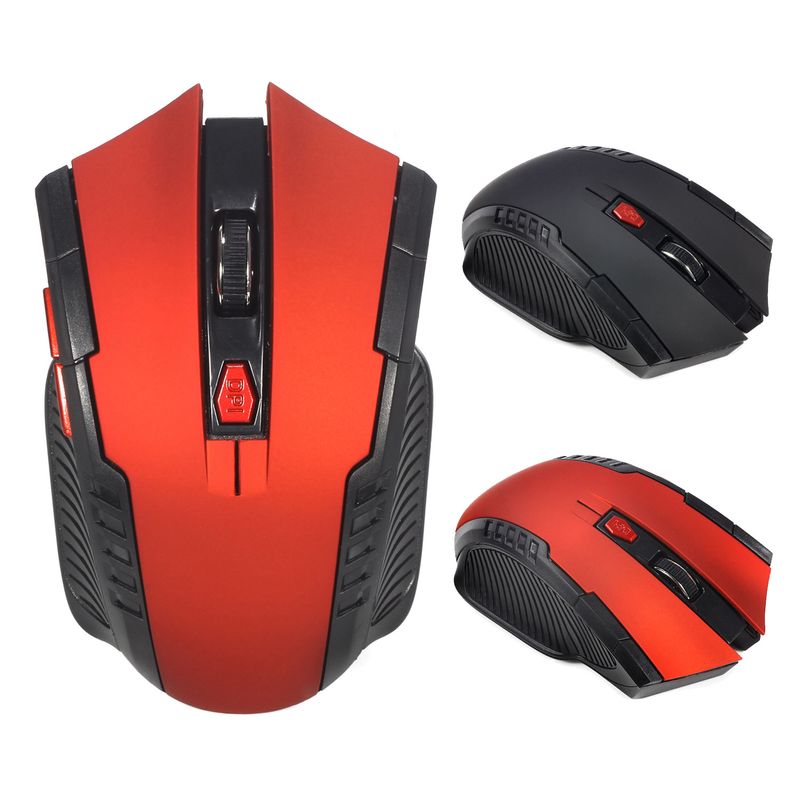
A882 6-key 2.4G Wireless 1600dpi Office Mouse Suitable For Desktop Laptop In Stock Wholesale
€22.05€34.66
Color : Red


Quantity :

Report
Include copyright infringementFree Standard Shipping. See details
Estimated between Thu, Jul 2 and Fri, Jul 10
You can return the product within 30 days of receipt. See details
Shop with confidence

Money Back Guarantee
Get the item you ordered or your money back. Learn more
About this item
Sourced from CoreBox
Seller assumes all responsibility for this listing.Item number: 33485228
Item specifics
Features
Mixed Light, Matte, Other
Axis
Optical Axis, Green Axis, Tea Axis
Numeric Keypad
No, Yes
Connection
Wireless
Size
<100Mm, >130Mm, 100Mm-120Mm
Item description from the seller
Basic information:
Mini adapter plug and play
Wireless transmission, long sensing distance up to 10-15 meters
Taşınabilir ve hafif, taşıması ve saklaması çok kolay
Pover switch to save pover
6 keys are available, including a scroll wheel, page forward and page backward buttons, which are convenient for browsing the internet
Operating distance up to 10 meters
Product Specification:
IC model: MX8650
Return Rate: 250 Hz
Movement speed: 28 IPS
Refresh Rate: 3000 FPS
Acceleration: 10 G
Resolution: 800DPI, 1200DPI, 1600DPI adjustable
Color: Black, Red
Power Supply: 2 x AAA Batteries Not Included
Mouse type: Wireless Optical Mouse
Interface: USB
Size: 10.3 * 6.4 * 3.8cm
Net weight: 64g
Package size: 10.5 * 8.5 * 4.7cm
Gross weight: 94 g
Patskage includes:
1 x 2.4GHz Wireless Portable Optical Mouse Battery not included
1 x USB receiver
System Requirements:
Windows98/Me/2000/XP/Vista/Win7/Win8/win10/Win11 or Mac latest
Three-level power saving mode:
1: Three sets
cond into the first sleep light flash
hing continuously
2: After about 1 minute, it enters secondary sleep mode with intermittent flashing lights
3: After about 8 minutes, go to level 3 sleep, the light goes out
How to use:
1: First, open the back cover of the mouse, take out the USB receiver, and insert it into the USB port of the computer
2: Then install the AAA battery, turn on the power switch, and it can be used
3: Note: This mouse requires 2*AAA batteries. AAA batteries are not included


Videos
Videos for this product

 4.4 out of 5 based on 9,249 reviews